How to convert a PDF to EPUB
E-readers are made for EPUB: the text wraps to the screen at the size you pick. A PDF on a six-inch e-reader is a whole page shrunk to fit. Converting the PDF to EPUB fixes that, as long as the conversion keeps the document's structure.
Updated November 15, 2026
What a good PDF to EPUB conversion keeps
A PDF records where each letter goes on the page, not what the text is. A converter has to work out the rest: which lines are a heading, where a paragraph carries on across a column or a page, which text is a running head to leave out. When it guesses wrong, you get the familiar problems:
- the running head and page number in the middle of a sentence, on every page;
- two columns read straight across, mixing their lines;
- a table turned into a stream of numbers;
- equations turned into scrambled symbols;
- the whole document as one long chapter, with no table of contents;
- a title made of letters and numbers, and “Unknown Author”.
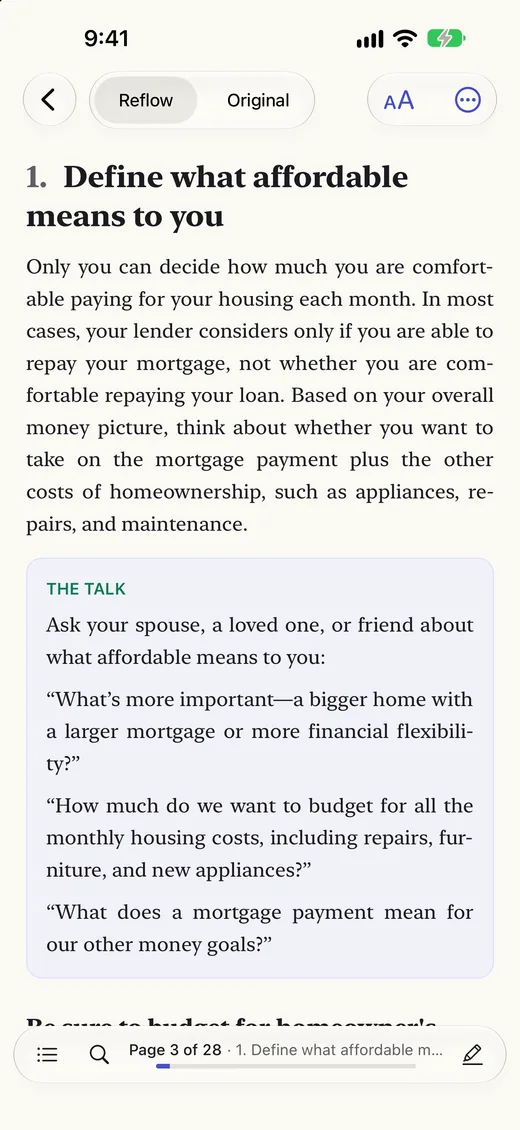
A good conversion reads the page the way a person does: the columns in order, headings as headings, tables with their rows and columns, equations as math, and footnotes linked to the text they belong to.
How to convert a PDF to EPUB with Unpage
- Add the PDF to Unpage on your iPhone, iPad or Mac. Tap + to choose a file or open a link, or drag the PDF into the library on iPad and Mac.
- Let it convert. The conversion runs on your device, page by page, and the library shows how far it has got. Nothing is uploaded. You can read the document while it converts.
- Look over the passages to check. If Unpage marked any, open To Check, compare each one with the page, and choose Looks right or Fix this. Your fixes go into the EPUB.
- Export the EPUB. In the reader, open the ⋯ menu and choose Export EPUB (part of Unpage Pro). On iPhone and iPad, save it to Files or open it in Books. On the Mac, choose File › Export EPUB… (⇧⌘E).
What's in the EPUB
- EPUB 3, checked with EPUBCheck, the standard validator.
- Chapters at the document's top-level sections, and a table of contents down to the third heading level.
- Footnotes linked from the text, so readers that support it show them as pop-ups.
- Tables as tables, figures as images with their captions, and equations as MathML.
- Boxed tips and sidebars as sidebars.
- The document's own title. Missing details are left out, never invented.
Reading it on your e-reader
- Apple Books on iPhone, iPad and Mac: open the EPUB and choose Books. Books shows equations as math.
- Kobo: connect the e-reader to your computer with its USB cable and copy the EPUB onto it.
- Kindle: send the EPUB with Amazon's Send to Kindle, from the app, the website or by email. Amazon converts it for the Kindle; how equations come out depends on the Kindle.
- Other e-readers and reading apps that read EPUB open it as it is.
Rather keep the PDF?
You can also read the converted document in Unpage itself, on iPhone, iPad and Mac, with the original page a tap away. See how to reflow a PDF on iPhone. With Unpage Pro you can also export the PDF with your highlights and notes in it.
Convert your PDFs to EPUB
Reading and converting are free for 3 new documents a week. Unpage Pro, $12.99 once, adds EPUB export and as many documents as you like, on iPhone, iPad and Mac.