
PDF reflow: what it is, and how to reflow a PDF
A PDF is a printed page on a screen: every word sits at a fixed place on it. Reflow takes the words off the page and lets them wrap to the screen you are holding, at a size you can read. Here is what reflow is, why PDFs resist it, and the ways to do it, with what each is good at.
Updated November 18, 2026
What PDF reflow means
Reflowing a PDF means setting its text again for a different width. Instead of a page made for paper, shrunk onto a phone, you get one column that wraps at the edge of the screen, like a web page or an e-book. You choose the size of the text, and the lines break to suit.
The word comes from typesetting: change the width, and the text flows into new lines. E-books in EPUB reflow by design. A PDF is the opposite, a fixed layout, so that a page looks the same on every screen and from every printer. That is its strength on paper and its trouble on a phone.
Why a PDF doesn't reflow by itself
A PDF records where each character goes on the page, not what it belongs to. It doesn't have to say which words make a paragraph, where one column ends and the next begins, or that the small line at the foot is a page number. Anything that reflows a PDF has to work that out:
- Columns and reading order. Two columns must be read down, then across, not line by line across the page.
- What isn't the text. Running heads and page numbers repeat on every page and don't belong in the flow. Footnotes belong with the sentence that points to them.
- Tables. A table is a grid; taken as lines of text it becomes rows of loose numbers.
- Equations. Math is set in two dimensions. Read as a line of characters, it turns into scrambled symbols.
- Figures. A picture belongs next to its caption, and the words inside it aren't part of the text.
- Scans. A scanned PDF holds pictures of pages and no text at all, unless it has been through OCR.
Some PDFs carry tags, a hidden outline of their structure made for accessibility, and tagged PDFs reflow much better. Most PDFs you meet, research papers above all, have no tags or poor ones.
Six ways to reflow a PDF
They differ in one thing above all: whether they trust what the file says about itself, its text and its tags, or look at the page the way a reader does.
| Way | Where | What it does | Keep in mind |
|---|---|---|---|
| Reflow view in Acrobat | Windows, Mac | Shows the PDF as one column that fits the window, as a temporary view for reading. | It follows the PDF's tags, so how well it works changes from file to file. |
| Liquid Mode in Acrobat Reader | iPhone, iPad, Android | Adobe's servers read the PDF and return a version that reflows, with an outline. | Adobe lists limits: over 200 pages or 10 MB, scans, forms, and pages that are mostly tables or images. See Liquid Mode and Unpage compared. |
| Text extraction in a PDF reader | iPhone, iPad | Pulls the PDF's text out and shows it as plain text at your size. GoodReader's PDF Reflow works this way. | Plain text only: no tables, equations or pictures, and the order can differ from the page. A scan needs OCR first. |
| KOReader with K2pdfopt | E-ink readers, Android | Works from the picture of the page and rearranges it for a narrow screen, so scanned books reflow too. | Made for e-readers; there is no iPhone version. |
| Converting to EPUB | Computer or phone | Makes an e-book file from the PDF, which every e-reader then reflows. | Only as good as the converter: columns, tables and equations are where conversions go wrong. See how to convert a PDF to EPUB. |
| Unpage | iPhone, iPad, Mac | Reads each page on your device and rebuilds the document: headings, lists, tables, equations, figures and footnotes, with every passage linked to its place on the original page. | Tables and equations need an iPhone 12 or later. A long document takes a while to convert in full, though you can start reading within seconds. |
For the apps on iPhone and iPad side by side, see PDF reflow apps compared.
What good reflow keeps
- The order. Columns, sidebars and footnotes read in the order the author meant.
- The structure. Headings stay headings, with a table of contents to move between them. Lists stay lists.
- Tables and math. A table keeps its rows and columns, and an equation stays an equation.
- Figures with their captions, at a size you can zoom.
- Nothing extra. Running heads and page numbers are left out of the text.
- A way back to the page. Reflow is a reading of the page, and a reading can be wrong. You should be able to check any passage against the original.
Reflow and accessibility
Reflow matters most to people who read with large text. The Web Content Accessibility Guidelines ask that content can be read at a narrow width without scrolling in two directions (success criterion 1.4.10, “Reflow”). A fixed page can't do that by itself, which is why accessible PDFs are tagged, and why a reader that reflows is useful well beyond phones.
How to reflow a PDF with Unpage
- Add the PDF. Tap + and choose a file, open a link, scan pages with the camera, or share a PDF to Unpage from another app.
- Start reading. Within seconds the whole document reads as text. Unpage then converts it carefully, page by page, on your device: tables become real tables and equations real math.
- Check anything. Tap a paragraph to see it outlined on the original page, or switch to Original at any time.
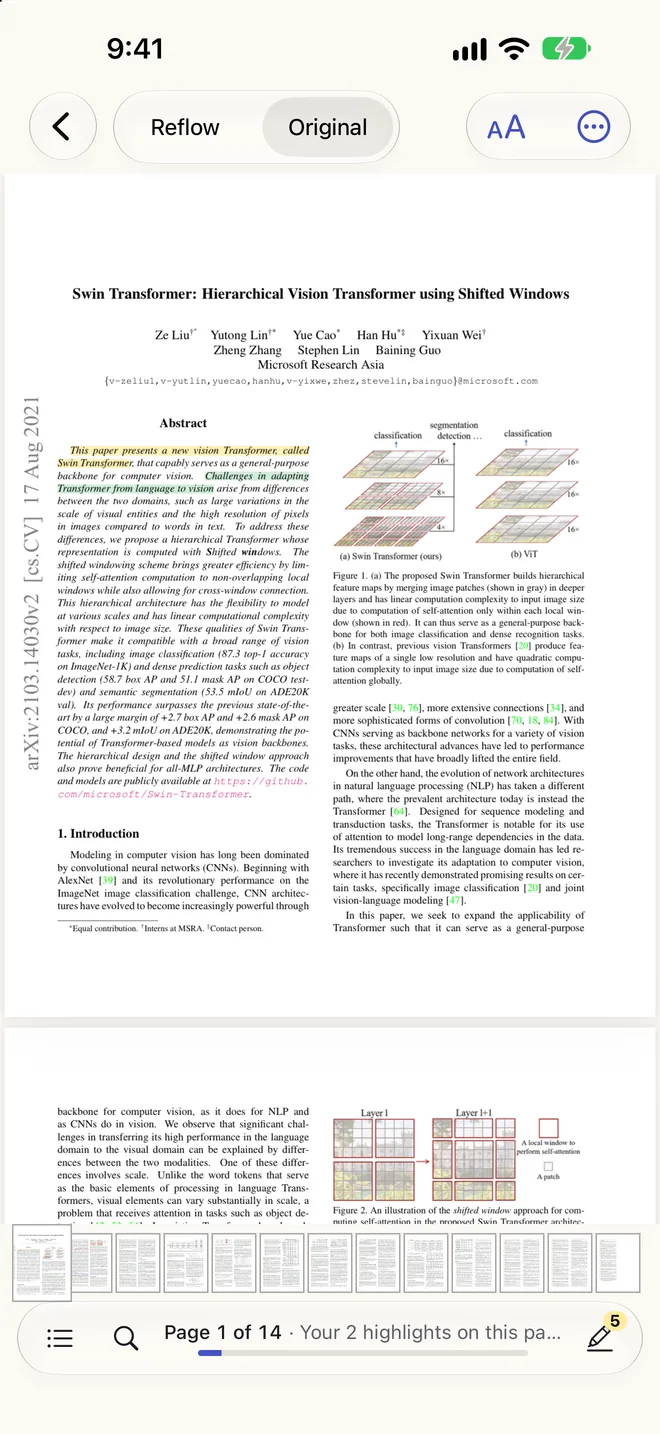
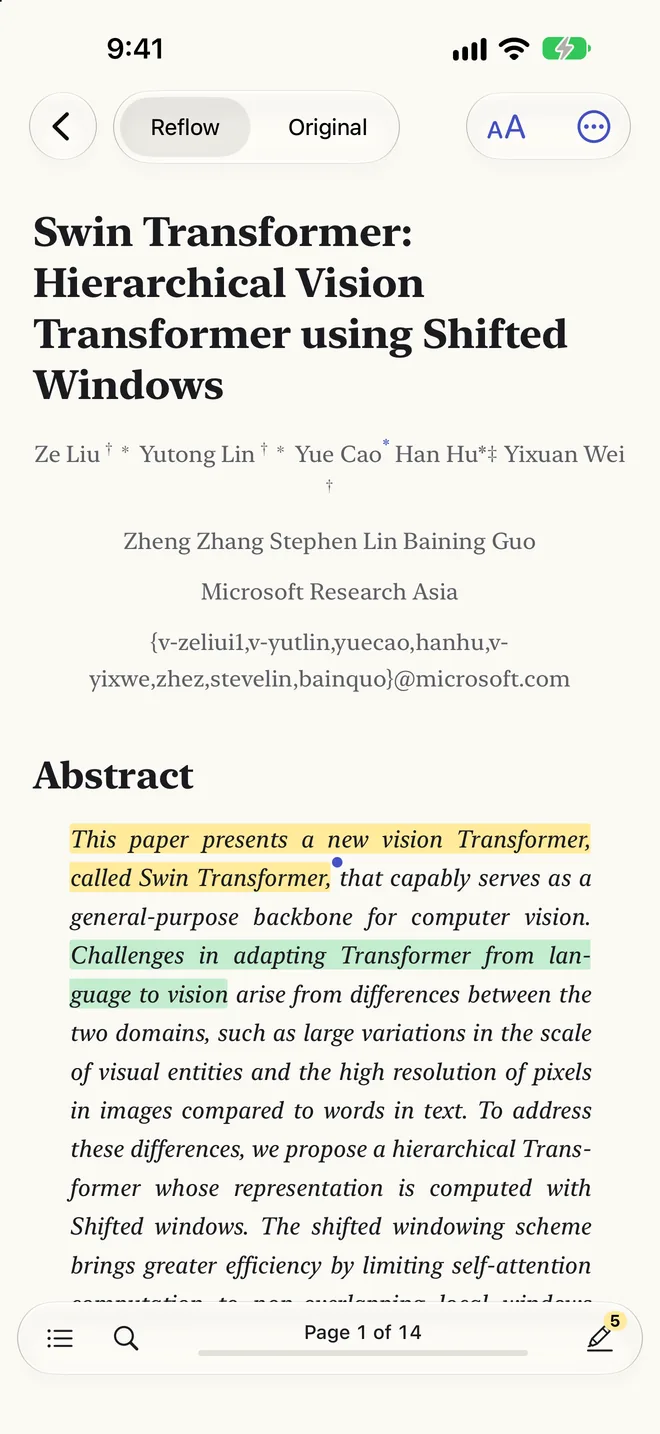
The steps in full are in how to reflow a PDF on iPhone and iPad.
Questions
Can every PDF be reflowed?
Any PDF with readable pages can be, but how well depends on the method. Plain prose reflows with almost anything. Two columns, tables, equations and scans need a tool that reads the layout of the page.
Does reflowing change my PDF?
No. Reflow is another view of the same document, and the PDF file stays as it was. In Unpage the original pages are one tap away, and each paragraph links to its place on them.
Can I reflow a scanned PDF?
Yes, with a tool that reads pictures of pages. Unpage reads scans and photos of pages on your device. Tools that only pull out a PDF's text have nothing to show for a scan that hasn't been through OCR.
Is PDF reflow the same as converting a PDF to EPUB?
Nearly. Reflow is what you see on the screen; EPUB is a file format that reflows. A reader that reflows a PDF well has done most of a conversion, and Unpage can export what it shows as an EPUB.
Does PDF reflow need an internet connection?
It depends on the tool. Unpage converts PDFs on your device, so it works offline and nothing is uploaded. Adobe's Liquid Mode processes files on Adobe's servers.
Read your PDFs like an e-book
Unpage is free for 3 new documents a week. Unpage Pro adds as many as you like and EPUB export, for one price on iPhone, iPad and Mac.

What this page says about other products comes from their makers: Adobe's Liquid Mode help, GoodReader's PDF Reflow manual and KOReader's project page, read on November 18, 2026. The accessibility guideline is WCAG 2.1, Reflow. If something here is out of date, tell us.